Enforce Room Move Reasons Selection During Room Moves
Stay is enhanced to enforce users to choose a room move reason either for all room moves performed within Stay or for room moves between different room types.
To support this enhancement, the following changes have been made:
-
The existing room move reasons and the Configure for Tenant/Property options are moved to the Reasons tab in the Room Move Reason screen (Settings ➜ All Settings ➜ Reservations ➜ Room Move Reasons).
-
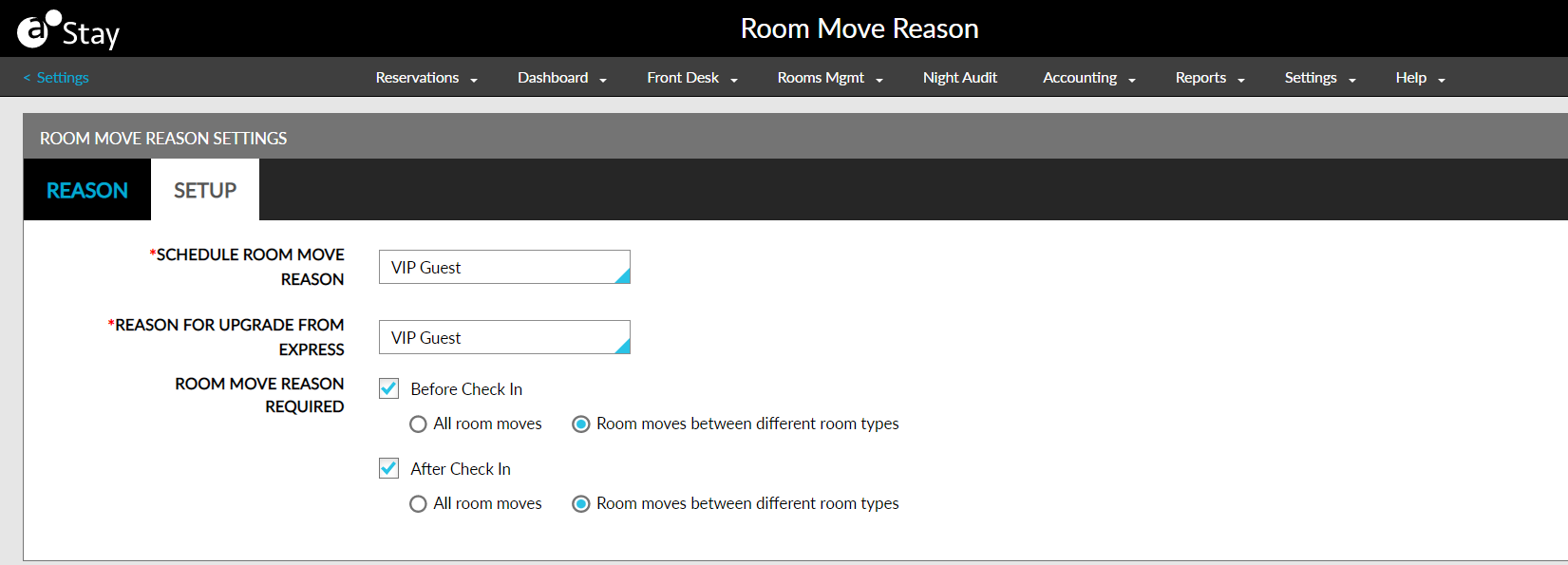
A new tab, Setup, is added to the Room Move Reason screen that displays the following options:
-
Schedule Room Move Reason: Allows users to select a default reason from the drop-down list for scheduled room moves.
-
Reason for Upgrade from Express: Allows users to select a default reason for room upgrades made from Agilysys Express before check-in.
Reason for Upgrade from Express field will be displayed only if Stay is integrated with Agilysys Express Mobile.
-
Room Move Reason Required - Before Check-In: When this checkbox is enabled, users can choose any of the following options:
-
All Room Moves: Users can select this option to make room move reasons mandatory for all room moves before check-in.
-
Room Moves Between Different Room Types: This option is selected by default. Users can select this option to make room move reasons mandatory for room moves between different room types before check-in.
-
-
Room Move Reason Required - After Check-In: When this checkbox is enabled, users can choose any of the following options:
-
All Room Moves: Users can select this option to make room move reasons mandatory for all room moves after check-in.
-
Room Moves Between Different Room Types: This option is selected by default. Users can select this option to make room move reasons mandatory for room moves between different room types after check-in.
-
-